9.2 | Managing & Packaging the Client Project
Key Terms
- Restricted Font
- A licensed font whose terms don’t allow its files to be shared or redistributed with a client or another designer, even inside a project package. Illustrator’s Package feature flags these separately from fonts that are safe to include.
- Model Release / Location Release
- A signed legal document in which a photographed person (model release) or property owner (location release) grants permission for their likeness or location to be used in a commercial project. Required before using a photo containing an identifiable person or a distinctive private location commercially, regardless of who holds the photo’s copyright.
- File Package
- The folder Illustrator’s File > Package command builds automatically, containing a copy of the document, every linked asset, every font used (where licensing allows), and a summary report. The standard way to hand a project off to a client or another designer without broken links or missing fonts.
A finished design isn’t actually finished until the client can open it, on their own computer, with nothing missing. That’s what packaging is for.
Back in Unit 1 you learned to plan around a client’s goals. Today is the other end of that same relationship: how do you hand off a finished file so it actually works when it leaves your computer?
[10 Mins] Bell Ringer / Hook
You email a client your finished .ai file. They open it and every font looks wrong, and a photo you placed is missing entirely. What went wrong?
“Nothing broke. The file just wasn’t packaged. Today’s lesson fixes that, permanently.”
[10 Mins] Direct Instruction
“I Do”: using a practice document with one linked image and one non-standard font, the teacher live-demos:
- Running File > Package, choosing a destination folder, and reviewing the options (copy linked files, collect fonts, create report).
- Opening the resulting folder structure, Links, Fonts, and the document itself, and the summary report Illustrator generates automatically.
- Reading the report to find a flagged restricted font and discussing what that means: the font’s license doesn’t allow its files to be redistributed with the client, so the report marks it separately from fonts safely included.
- Reviewing a hypothetical client photo scenario and discussing when a model or location release would be required before delivery, not just before shooting.
Check for Understanding Recall: “What menu command builds a complete delivery folder in one step?” Analysis: “Why does Illustrator flag some fonts as restricted instead of just including every font automatically?” Synthesis: “You’re delivering a flyer that uses a photo of a real person taken in a client’s private office. What two things does this lesson say you need on file before you ship it?”
[23 Mins] Guided Practice
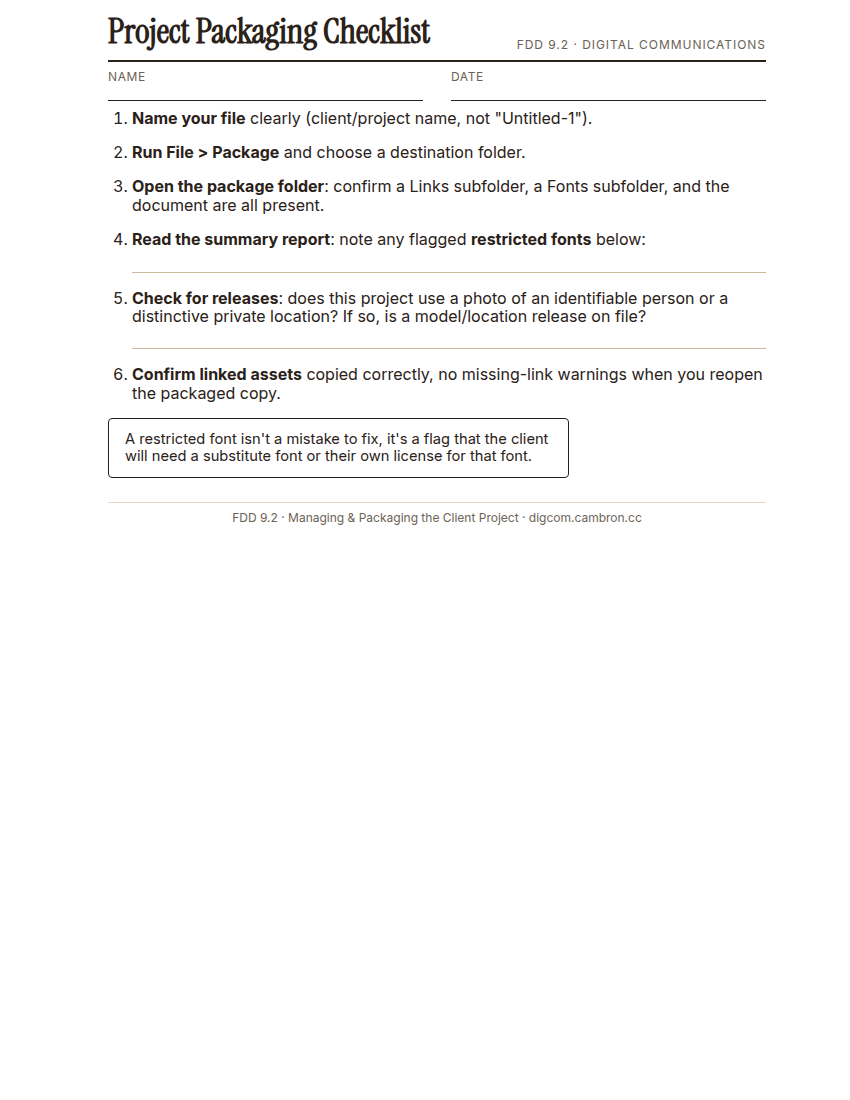
Complete the handout, three hole punch it, and keep it in your class binder.
⬇ Download Worksheet (PDF)- Open the provided practice file and run File > Package.
- Open the resulting folder and the summary report, and confirm the linked image copied correctly.
- Find and record any restricted font flagged in the report.
- Partner audit: trade with a partner and check each other’s package folder. Did they catch the same restricted font?
- Write one sentence on what you’d tell the client about any font substitution needed.
[30 Mins] GMetrix / BrainBuffet Self-Guided Strand
Finish GMetrix Module 6. Generative AI & Exam Tips. Its client-feedback and file-management portions match today’s packaging lesson directly.
[5 Mins] Exit Ticket / Wrap-Up
Save your packaged folder as LastName_FirstName_9_2_Package/.
🗂 Organize: Put one sentence naming any restricted font found, or confirming none were in your binder. Save your packaged folder (screenshot of its contents and the summary report) in the Project Files folder of your Digital Design project folder on Google Drive.
📤 Exit Ticket: Glow & Grow. On a scrap of paper, write about today’s work in at least 3 sentences (aim for 5): describe one Glow (something that went well) and one Grow (one thing you’d do differently or improve next time), explaining each with real detail, not just a phrase.
Stuck on how to start? Try: “My Glow today was ___, because ___. My Grow is ___. Next time I’ll try ___.”