6.1 | Saving & File Formats
Key Terms
- .AI (Adobe Illustrator Document)
- Illustrator’s native, fully-editable format. Layers, paths, and text all stay live for future edits.
- .EPS (Encapsulated PostScript)
- A legacy vector interchange format, still requested by some print vendors and older software, mostly superseded by .ai and .pdf in modern workflows.
- .PDF (Portable Document Format)
- A vector-friendly, universally viewable format that can preserve full editability (via “Preserve Illustrator Editing Capabilities”). Often the safest way to hand a file to a client or printer.
- .SVG (Scalable Vector Graphics)
- A code-based vector format built for the web. Scales to any size with no quality loss, and can be styled or animated with CSS.
- .PNG (Portable Network Graphics)
- A raster (pixel-based) format that supports transparency. A common choice for exporting artwork for screens or web when a raster file is needed.
- .JPG / .JPEG
- A raster format using lossy compression with no transparency support. Small file sizes, common for photos, not ideal for crisp text or logos.
- Native vs. Interchange Format
- A native format (like .ai or .psd) keeps all of an application’s editable data; an interchange format (like .eps or .pdf) is built to move a file between different programs or people, sometimes at the cost of some editability.
Welcome to Unit 6. Refinement & Output Prep. Every skill in this unit is about the last mile: making sure a finished piece is actually correct for wherever it’s headed next. Today’s question: which file format do you actually need?
Direct Instruction | Live Export Comparison (~10 min)
“Watch what happens to this same logo when I export it 4 different ways. Same artwork, 4 very different files.”
The teacher live-exports one piece of artwork as .pdf, .svg, .png, and .jpg, comparing file size, whether transparency survived, and whether the result is still editable.
Recall: What’s the difference between a vector format and a raster format? Analysis: Why would a .jpg be a poor choice for a logo that needs a transparent background? Synthesis: If a print shop asked for a “universally viewable proof that still preserves editing,” which format would you send, and why?
Guided Practice | Match & Export (~23 min)
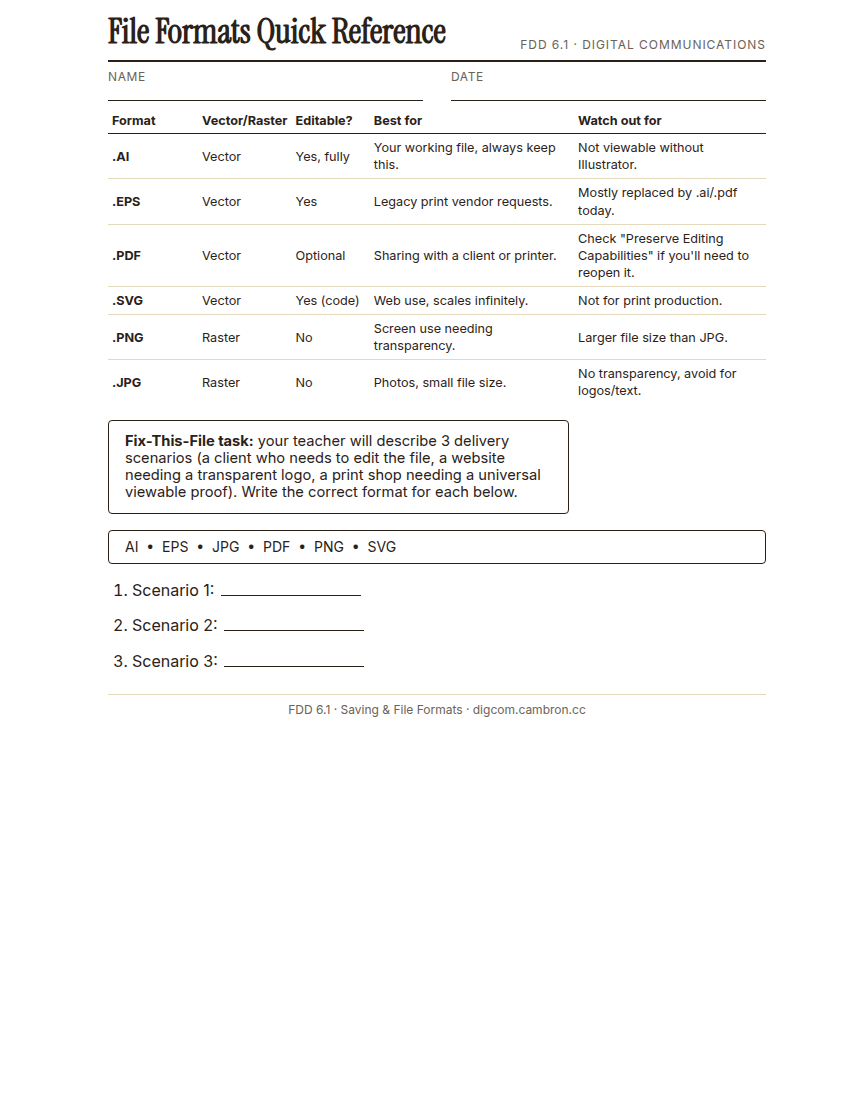
Complete the handout, three hole punch it, and keep it in your class binder.
⬇ Download Worksheet (PDF)- Match (~8 min): your teacher will describe 3 delivery scenarios. Write the correct file format for each on your reference sheet.
- Export (~15 min): open the provided artwork file and export it correctly for 2 different destinations (for example, a transparent PNG for a website, and a print-ready PDF for a client).
Always keep your original .ai file, no matter what you export. It’s the only format that keeps everything fully editable for next time.
Exit Ticket / Wrap-Up (~5 min)
Screenshot both of your exported files side by side.
Which format would you choose to send a finished logo to a screen printer, and why?
🗂 Organize: Put your 3 scenario-matching answers in your binder. Save your screenshot receipt of 2 exported formats in the Exports folder of your Digital Design project folder on Google Drive.
📤 Exit Ticket: Stoplight. In the discussion board below, let us know how you’re doing: G (green: I’ve got this, ready to move on), Y (yellow: I mostly get it, still have a question), or R (red: I’m stuck, I need help). Then explain your rating in at least 3 sentences (aim for 5): what specifically about today’s skill makes you feel that way, and, if you’re yellow or red, what your actual question is.
Stuck on how to start? Try: “I picked ___ because ___. Specifically, when I tried to ___, I ___. One thing that would help is ___.”