7.1 | Script Formatting & Storyboarding
Key Terms
- Slugline
- The all-caps shot heading that opens a scene (INT./EXT., location, time of day). Tells the crew where and when a scene happens before a single word of action or dialogue.
- Parenthetical
- A short direction in parentheses under a character’s name, telling an actor how to deliver a line (whispers), (sarcastic). Used sparingly, overusing them reads as micromanaging the actor.
- Scene Heading
- Another name for a slugline. INT. KITCHEN - NIGHT is a scene heading.
- Two-Column Script
- A script format that splits visuals (left column) from audio/dialogue (right column), common for commercials, music videos, and documentary-style projects instead of standard screenplay format.
- Beat
- A pause or turning point in a scene’s action or dialogue, marked in a script to control pacing and give an actor or editor a place to breathe.
- Storyboard
- A sequence of sketches previsualizing a shot’s framing and camera angle before filming. Doesn’t need to be polished, just clear enough to communicate the plan.
- Shot List
- A written, ordered list of every shot a production needs, often tied to specific timing or story beats.
- Pre-Production
- All the planning work that happens before filming. Scripting, storyboarding, securing rights, scheduling.
- Royalty-Free Music
- Music licensed for a one-time fee (or free) that can be used repeatedly without ongoing royalty payments. A safe choice when a production doesn’t have rights to original music.
- Public Domain
- Creative work no longer (or never) protected by copyright. Free to use without permission or licensing.
- Synchronization Rights
- Legal permission to pair a piece of music with visual media. Required any time you use someone else’s music in a video, even a school project.
Every short film starts as words on a page, formatted a specific way so a director, camera operator, and editor can all read it fast and agree on what happens next.
Direct Instruction (~10 min)
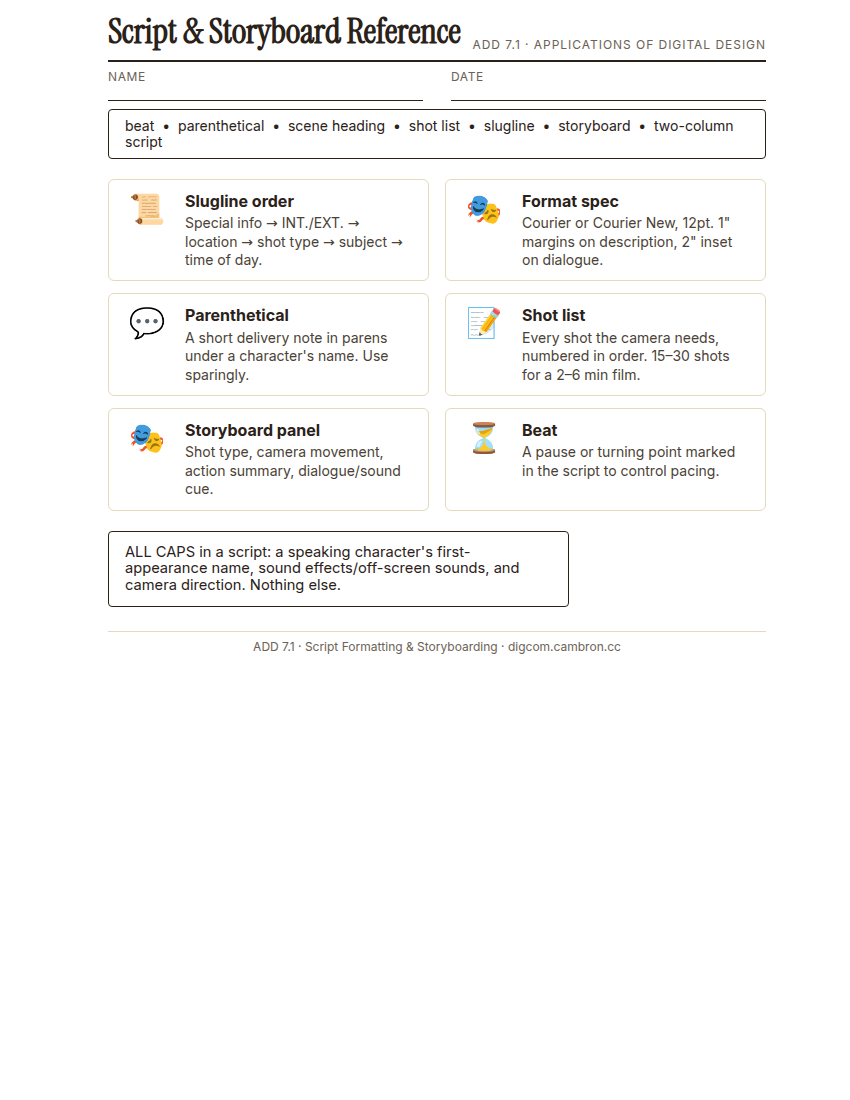
Complete the handout, three hole punch it, and keep it in your class binder.
⬇ Download Worksheet (PDF)Hollywood convention exists so a script reads consistently no matter who wrote it. Font is Courier or Courier New, 12-point (a monospaced font makes 1 page roughly equal 1 minute of screen time). Margins: shot descriptions run a full 1 inch, dialogue insets to 2 inches with the character’s name centered above it. Every scene opens with a slugline in this exact order. special information (flashback, slow-motion) first, then INT. or EXT., the location, shot type, subject, and time of day last.
Three things get written in ALL CAPS: a speaking character’s name the first time they appear, sound effects or off-screen sounds, and camera direction. Parentheticals tell an actor how to deliver a line, used sparingly. Once you have a formatted scene, break it into a shot list. every shot the camera needs, numbered in order, then sketch each one as a rough storyboard panel: stick figures are fine, the point is composition, not art.
“A slugline out of order isn’t just messy, it’s a crew member on set not knowing where or when a scene happens until they’ve read the whole line twice. Order exists so nobody has to guess.”
Scaffolded questions. Cold-call through all three:
Recall: “What order do the parts of a slugline go in?”
Analysis: “Why might a two-column script work better than standard screenplay format for a music video or commercial?”
Synthesis/Extension: “You have a 3-page script. Roughly how many shots would you expect to need, and why isn’t that the same as the number of scenes?”
Guided Practice (~23 min)
- Format a short scene (provided, unformatted) to spec: Courier 12pt, correct margins, sluglines in the right order, ALL CAPS where required.
- Break the scene into a shot list: number every shot the camera needs (15-30 shots for a 2-6 minute film is the target range for the final short film, this scene will be shorter).
- Storyboard each shot: a quick sketch per shot noting shot type, camera movement (if any), and a one-line action summary.
- Turn and Talk: trade with a partner. Do your storyboard panels tell the story without the script? If not, what’s missing?
Which was harder to plan for: what the camera sees, or what the audience hears?
GMetrix/BrainBuffet (~30 min)
Continue this term’s Premiere Pro GMetrix module.
Exit Ticket / Wrap-Up (~5 min)
🗂 Organize: Put your formatted scene and your shot list and storyboard sketches in your binder.
📤 Exit Ticket: Stoplight. In the discussion board below, let us know how you’re doing: G (green: I’ve got this, ready to move on), Y (yellow: I mostly get it, still have a question), or R (red: I’m stuck, I need help). Then explain your rating in at least 3 sentences (aim for 5): what specifically about today’s skill makes you feel that way, and, if you’re yellow or red, what your actual question is.
Stuck on how to start? Try: “I picked ___ because ___. Specifically, when I tried to ___, I ___. One thing that would help is ___.”